Lead Delivery / WordPress plugin
WordPress forms.Connected to Lasso CRM.
Send website leads directly from WordPress into Lasso CRM with a purpose-built integration designed for real homebuilder workflows.
Free version in WordPress.org review.
The problem
Your website captures the lead. Your sales team works in Lasso.
Connecting the two shouldn’t require an awkward workflow. When someone asks “did that website lead come through?”, the answer should be easy to find.
The connection
WordPress → Lead Delivery → Lasso
Lead Delivery is a WordPress-native connection between your website’s lead forms and Lasso CRM.
It runs inside WordPress, alongside the forms your site already uses. Each submission is saved on your site, matched to the fields Lasso needs, then sent.
- Forms
- Contact Form 7 · Gravity Forms
- Before sending
- Saved on your site
- After sending
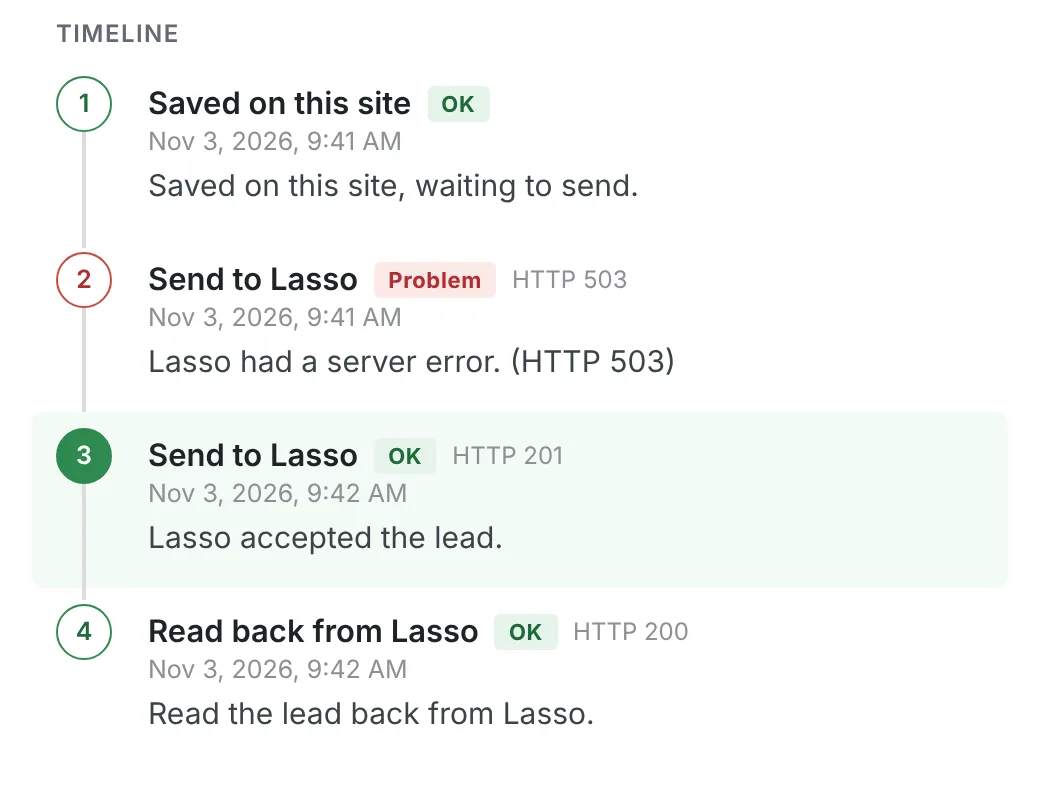
- Delivery Log

How it works
Connect. Map. Deliver.
Three steps, set up once in WordPress. After that, every submission follows the same route.
Connect
Configure Lead Delivery with the Lasso connection details for your project.
Lasso project · API key
Map
Connect your WordPress form fields to the information Lasso needs.
Form field → Lasso field
Deliver
When a visitor submits the form, Lead Delivery sends the lead into Lasso and records the result.
Delivery Log · Accepted
Product interface
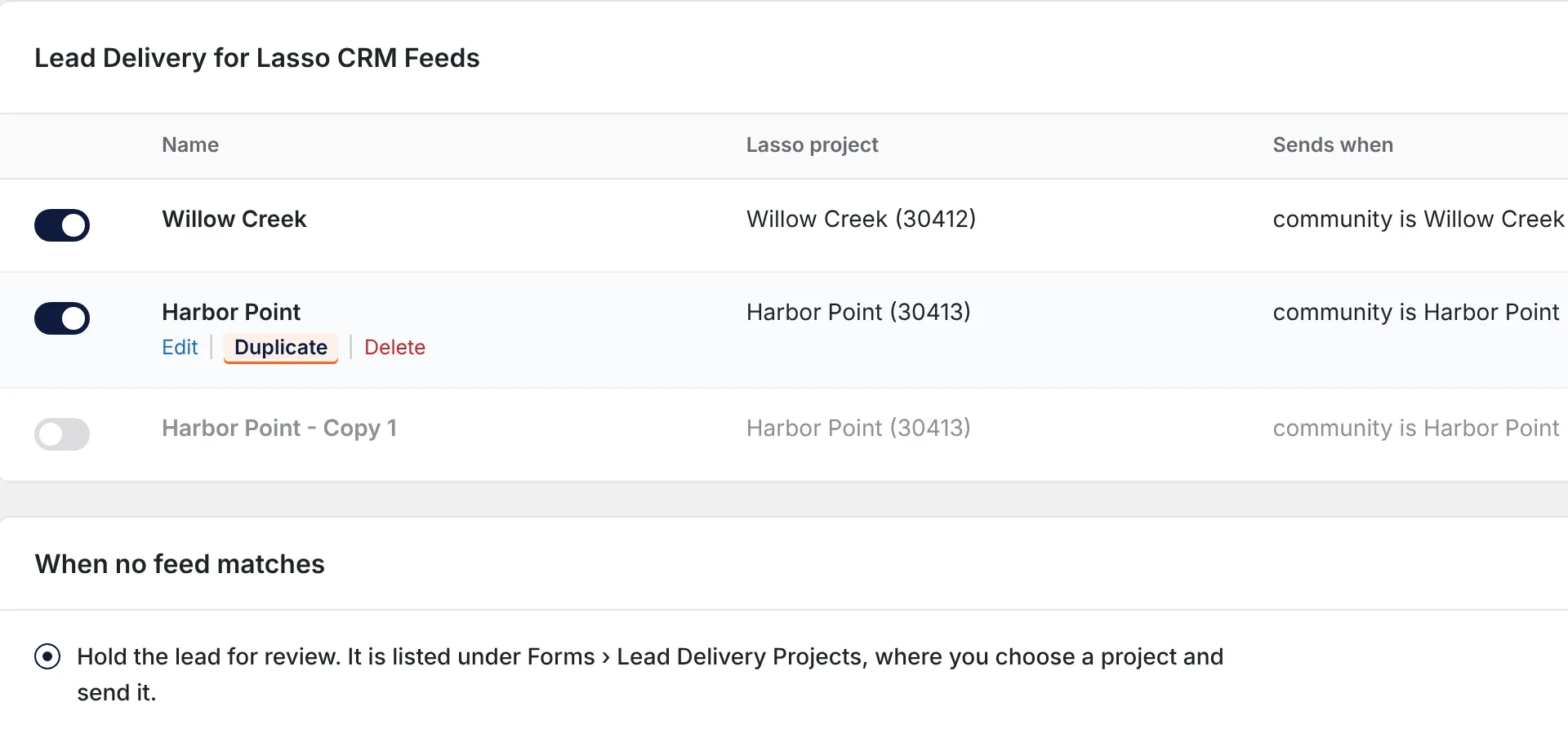
Built to feel like WordPress.
Lead Delivery lives inside the WordPress workflow instead of sending teams to another platform just to manage the integration.

Choose what fits
Start free. Move to Pro when you need more.
Free
Lead Delivery
For one Lasso project and Contact Form 7.
In WordPress.org review
Pro
Lead Delivery Pro
For several projects, routing by answer and Gravity Forms.
From $149 / year · Checkout by Freemius
See Pro plans| Capability | Free | Pro |
|---|---|---|
| Contact Form 7 | Yes | Yes |
| Gravity Forms 2.5+ | Not included | Yes |
| Lasso projects | One | Multiple |
| Field and question matching | Yes | Per project |
| Delivery Log, retries and alerts | Yes | Yes |
| Optional consent-aware tracking | Yes | Yes |
| Routing by answer | Not included | Yes |
| Fallback project or hold for review | Not included | Yes |
| Guided project setup | Not included | Yes |
Delivery reliability and basic tracking are in both. Pro is an add-on: the free plugin stays installed and active.
Pricing · Lead Delivery Pro
Choose the websites you need to connect.
All plans include the same Pro features, multiple Lasso projects, updates and product support during the active subscription.
Single Site
1 website
$149/ year
Get Single SiteOpens checkout
Business
5 websites
$289.99/ year
Get BusinessOpens checkout
Agency
20 websites
$589.99/ year
Get AgencyOpens checkout
Billed yearly and renews automatically until canceled. Taxes are calculated at checkout. 14-day money-back guarantee.
Checkout is handled by Freemius, our reseller and merchant of record. Lasso CRM and any Gravity Forms license are purchased separately; the free Lead Delivery plugin stays installed and active.
Why we built it
We ran into the problem ourselves. So we built it.
Lead Delivery came from real WordPress and homebuilder development work.
We needed a better way to connect WordPress lead forms with Lasso CRM. So we built one — and then kept building it until it held up on real websites.
— ForgeStudio
=== Lead Delivery for Lasso CRM ===
Requires at least: 6.6
Requires PHP: 7.4

Forms: Contact Form 7
       Gravity Forms 2.5+ (Pro)
One API key per Lasso projectWho it’s for
Built for the people actually using Lasso.
- 01
Homebuilders
Enquiries from every community page reach the Lasso project your sales team works in.
- 02
Marketing teams
Keep the forms you already use, and see what happened to each lead in the Delivery Log.
- 03
WordPress developers
Configure it in the Contact Form 7 editor or in Gravity Forms feeds, inside WordPress.
- 04
Agencies
Set up the same connection across client websites. Pro plans cover 1, 5 or 20 sites.
- 05
Digital teams
Retries and email alerts when Lasso is unavailable, and a record your team can check.
For technical buyers
For the people who have to maintain it.
- WordPress-native workflow
- Settings live in the Contact Form 7 editor and in Gravity Forms feeds.
- Saved before sending
- Submissions are kept on your site first. Temporary failures are retried with growing gaps.
- A record you can check
- The Delivery Log shows each attempt and its result.
- Accepted · Verified · Retrying · Outcome unknown · Failed
- Alerts
- If delivery gives up, the people you choose are emailed.
- Requirements
- WordPress 6.6+ · PHP 7.4+ · a Lasso API key per project
- Documentation and support
- From the team that built it.
- [APPROVED SUPPORT CHANNEL]
Built by ForgeStudio
Lead Delivery is designed and developed by ForgeStudio, an independent design and technology studio building custom websites, applications, integrations and digital products.
FAQ
Questions.
A WordPress plugin that sends leads from your website forms into Lasso CRM. It saves each submission on your site, sends it to Lasso and records the result in a Delivery Log.
Yes. It connects to an existing Lasso account and needs an API key for each Lasso project. Lasso issues one key per project; ask your Lasso account contact.
From the WordPress.org Plugin Directory: [LISTING URL after approval]. You can also install it from Plugins › Add New in WordPress.
Multiple Lasso projects, routing by the visitor’s answer, a fallback project or hold for review when nothing matches, Gravity Forms 2.5+ and guided project setup.
A yearly licence for 1, 5 or 20 websites (Single Site, Business or Agency), bought through the Freemius checkout. Pro is an add-on, so the free plugin stays installed and active.
[APPROVED SUPPORT CHANNEL]
No. Your team keeps working in Lasso; Lead Delivery delivers your website leads into it.
WordPress forms. Connected to Lasso CRM.
Start with Lead Delivery free, or choose Pro for more advanced workflows.
Designed and developed by ForgeStudio.